Migrate Langfuse v3 to v4
We tried to make this upgrade as seamless as possible. Please ask in the v4 rollout GitHub Discussion or contact support in case you have any questions while upgrading to v4.
Langfuse v4 moves to an observation-centric data model built on a new, wide, and (mostly) immutable ClickHouse table. This eliminates joins and deduplication at read time and optimizes for the most performant ClickHouse access patterns. Initial table loads for large amounts of data go from seconds to milliseconds, and dashboard load times for large projects improve by 10x or more over longer time ranges. Read the technical deep dive and the overview of the new experience for more background.
Langfuse Cloud has been running on this data model since early 2026.
Follow this guide to:
- Understand what changes with Langfuse v4 and what does not.
- Upgrade in three independent steps, retaining your current behavior as long as you need it.
- Complete the move to the new data model on your own schedule.
What changes
The new data model
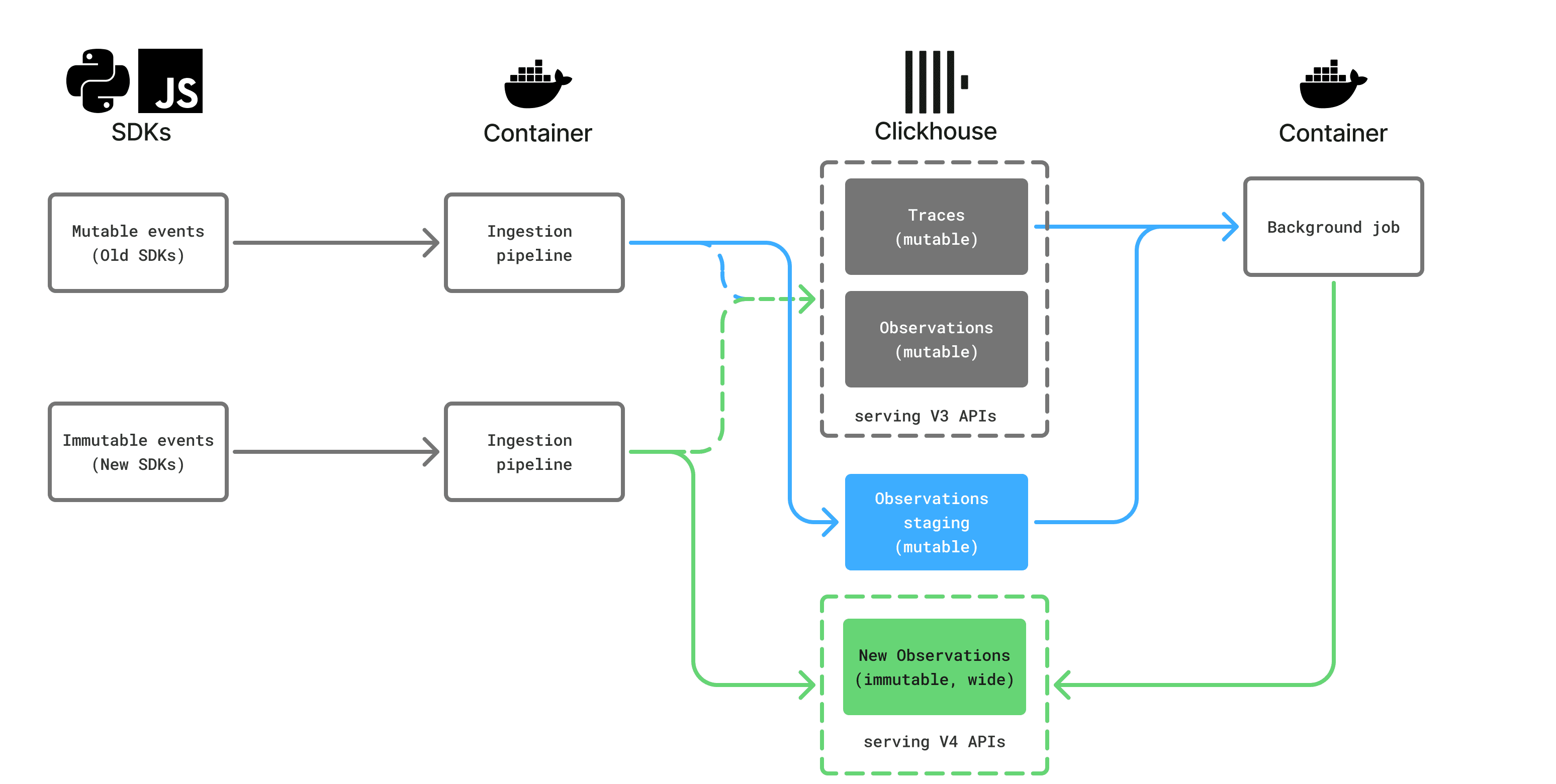
Langfuse v4 introduces two new ClickHouse tables that replace traces and observations as the source for all reads:
events_full: the immutable, full-fidelity event table. Every LLM call, tool execution, and agent step is one row, including all trace-level attributes (user, session, tags, release, version) directly on the row.events_core: a lightweight, query-optimized projection ofevents_fullwith truncated input/output/metadata, populated automatically via a materialized view. It serves table and chart queries.
Traces are represented as root spans within the same table instead of a separate entity. Existing traces are converted into virtual root spans (type SPAN, with span ID t-<trace_id>) so that historic data remains browsable.
The table schemas and all data migrations ship as regular migrations with Langfuse v4 — there is no manual schema work.
What does not change
The infrastructure architecture is unchanged. Langfuse v4 runs on the same components as v3: web and worker containers, PostgreSQL, ClickHouse, Redis, and S3/blob storage. No new services are introduced, and all data in PostgreSQL (projects, users, prompts, datasets, scores configuration, etc.) is unaffected. This is a change on the data-model level, not the infrastructure level.
UI changes
The main exploration surface is a single Observations view — the same experience that is live on Langfuse Cloud. There are no separate tabs for traces and observations anymore; trace_id acts like any other filter column (like session_id or user_id) to group related observations. See working with observations for common views and workflows, and dashboard changes for how charts behave on the new model.
Scores and comments that were previously attached to a trace are shown on the corresponding root observation.
API changes
Langfuse v4 serves reads from the new APIs that were introduced alongside the data model. The following legacy endpoints are unavailable on deployments that run the default write mode (events_only) — that is, all new deployments and migrated deployments after the cutover. While you run the legacy or dual write mode during your migration, these endpoints keep working as before.
Ingestion, replaced by OpenTelemetry-based ingestion:
| Endpoint | Behavior on v4 |
|---|---|
POST /api/public/ingestion | Keeps the 207 status code, but returns 400 for every event type except score-create, sdk-log, and dataset-run-item-create |
POST /api/public/traces | Returns 404 |
POST /api/public/spans | Returns 404 |
POST /api/public/generations | Returns 404 |
POST /api/public/events | Returns 404 |
Reads, replaced by the Observations API v2:
| Endpoint | Behavior on v4 |
|---|---|
GET /api/public/traces | Returns 404 |
GET /api/public/traces/:id | Returns 404 |
GET /api/public/observations | Returns 404 |
GET /api/public/observations/:id | Returns 404 |
GET /api/public/sessions | Returns 404 |
GET /api/public/sessions/:id | Returns 404 |
GET /api/public/spans | Returns 404 |
GET /api/public/generations | Returns 404 |
Scores, replaced by the Scores API v3:
| Endpoint | Behavior on v4 |
|---|---|
GET /api/public/scores | Returns 404 |
GET /api/public/scores/:id | Returns 404 |
GET /api/public/v2/scores | Returns 404 |
GET /api/public/v2/scores/:id | Returns 404 |
Metrics, replaced by the Metrics API v2:
| Endpoint | Behavior on v4 |
|---|---|
GET /api/public/metrics | Returns 404 |
GET /api/public/metrics/daily | Returns 404 |
Evaluations
Trace-based and legacy-dataset-based LLM-as-a-Judge evaluators perform lookups on the old tables. They are marked as Legacy in the UI, keep working during the legacy and dual write phases, and stop running after the cutover to events_only. Migrate them to observation-level evaluators before the cutover; see the evaluator upgrade guide.
Batch exports and integrations
The blob storage, PostHog, and Mixpanel integrations must be configured to use the enriched observations export source (changelog). The classic LEGACY_TRACES_OBSERVATIONS export source ("Traces and observations (legacy)") does not produce any data after the cutover to events_only.
Migration overview
The migration consists of three independent steps. Each step leaves your deployment in a stable state, so you can schedule them separately and pause in between:
- Upgrade your infrastructure — bring ClickHouse to a v4-compatible version while still on Langfuse v3.
- Upgrade the server to Langfuse v4 — retain your current ingestion behavior with the
legacyordualwrite mode. All schema migrations are applied automatically. - Move to the new data model — upgrade your SDKs, migrate historic data (automated backfill, or a retention-based rollover), and cut over to the v4 defaults.
New deployments skip all of this — see new deployments.
Step 1: Upgrade your infrastructure
Langfuse v4 raises the minimum infrastructure versions:
| Component | Requirement |
|---|---|
| ClickHouse | 25.12 minimum, 26.4 recommended. Required for lightweight updates, the JSON type, and full-text search. On versions below 26.6, set CLICKHOUSE_DISABLE_LAZY_MATERIALIZATION=true. |
| PostgreSQL | 16 recommended |
| Redis | 7.2 recommended |
Upgrade ClickHouse before the server upgrade. Langfuse v3 releases are fully compatible with current ClickHouse versions, so you can perform the ClickHouse upgrade on your existing v3 deployment and operate it as long as you like before continuing. See the ClickHouse deployment guide for version and operations guidance.
If you plan to use the historic backfill in step 3, also make sure the ClickHouse disks can handle roughly 3x the current data volume — data is copied into the events tables and, for the observations table, additionally into an intermediate format that is cleaned up at the end.
Step 2: Upgrade the server to Langfuse v4
Perform a regular server upgrade to the latest Langfuse v4 release. All ClickHouse schema migrations (the new events tables) are applied automatically on startup — including for deployments that adopted the tables early; existing tables are detected and skipped.
The only decision to make is the write mode you start with. It controls which tables ingestion writes to, and thereby how much of the v3 behavior you retain:
Choose this if all producers already use compatible SDKs (see below) and you do not depend on deprecated endpoints or trace-level evaluators. Typical for small setups that can coordinate an SDK upgrade ahead of the server upgrade.
No configuration is needed — this is the v4 default. Writes go exclusively to the new events tables, and the historic backfill starts automatically after the upgrade. Data from incompatible SDKs is rejected.
With this choice, your migration is already complete — step 3 does not apply.
Choose this if some producers still run older SDKs, or you want the new experience while keeping the old tables fully written as a safety net.
LANGFUSE_MIGRATION_V4_WRITE_MODE=dual
# Only if native OTel producers rely on server-side attribute propagation:
LANGFUSE_MIGRATION_V4_NATIVE_OTEL_BEHAVIOUR=dual_write
# Recommended until dual_write behaviour is confirmed to be working
# (see step 3):
LANGFUSE_BACKGROUND_MIGRATION_V4_ENABLE_HISTORIC_BACKFILL=false
# Optional: set false to keep the v3 read experience for all users while
# dual-writing (hides the toggle, disables the v2 APIs); defaults to true:
# LANGFUSE_MIGRATION_V4_ALLOW_PREVIEW_OPT_IN=false
Ingestion writes into both the old and the new tables: compatible SDKs directly, older SDKs via the dual-write pipeline with a ~10 minute delay. Each user can switch to the new read experience via the toggle in the UI, and the new v2 APIs become available — both gated by LANGFUSE_MIGRATION_V4_ALLOW_PREVIEW_OPT_IN (default true). Expect higher server load and S3 costs than events_only (comparable to v3 processing) until you complete the cutover.
Choose this if you want to de-risk the server upgrade by changing nothing else: legacy retains the full v3 ingestion and read behavior on the v4 release, so you can schedule the data-model migration entirely separately.
LANGFUSE_MIGRATION_V4_WRITE_MODE=legacy
LANGFUSE_MIGRATION_V4_NATIVE_OTEL_BEHAVIOUR=dual_write
# Keep the v4 read paths (UI toggle, v2 APIs) off — the events tables
# are not written in legacy mode:
LANGFUSE_MIGRATION_V4_ALLOW_PREVIEW_OPT_IN=false
LANGFUSE_BACKGROUND_MIGRATION_V4_ENABLE_HISTORIC_BACKFILL=false
Keep the historic backfill disabled while you run legacy. The backfill runs exactly once; if it runs before the dual write is active, everything ingested between the backfill and your later switch to dual would be permanently missing from the new tables.
Step 3: Move to the new data model
If you started with the dual or legacy write mode, complete the migration with the following steps, at your own pace.
Upgrade your producers to compatible SDKs
Langfuse v4 expects instrumentation that propagates shared attributes (like userId and sessionId) on the client side:
- Python SDK v4
- JS/TS SDK v5
- any native OpenTelemetry integration
These SDK versions are fully compatible with Langfuse v3 servers, so this step can start before, during, or after the server upgrade. Every migrated producer writes into the new tables directly (no delay) and reduces the load of the dual-write phase.
Also migrate trace-level evaluators and export configurations in this step.
Switch to the dual write mode
If you started on legacy, set LANGFUSE_MIGRATION_V4_WRITE_MODE=dual, set LANGFUSE_MIGRATION_V4_ALLOW_PREVIEW_OPT_IN=true (or remove the false override), and redeploy. From this moment, all incoming data lands in both the old and the new tables, and users can switch to the new read experience via the toggle in the UI.
Confirm the dual write is healthy before continuing: data from compatible SDKs appears immediately, data from older SDKs with a ~10 minute delay. The health endpoint can monitor the propagation job.
Migrate historic data
Data ingested before the dual write became active only exists in the old tables. Two options bring it into the new data model:
Option A: Automated backfill (default). Set LANGFUSE_BACKGROUND_MIGRATION_V4_ENABLE_HISTORIC_BACKFILL=true (or remove the false override) and redeploy. A chain of background migrations rewrites all historic traces, observations, and dataset run items into the new tables — without downtime, gradually, newest first. Requires the ~3x disk headroom from step 1.
Option B: Retention-based rollover. If your deployment enforces a global data retention policy (e.g. 30 or 90 days), you can skip the backfill entirely: keep LANGFUSE_BACKGROUND_MIGRATION_V4_ENABLE_HISTORIC_BACKFILL=false and simply keep dual-writing until one full retention window has elapsed since you enabled dual. At that point, everything within retention exists in the new tables, and older data has aged out by policy.
Cut over to the v4 defaults
Once all producers run compatible SDKs and historic data is covered (backfill completed, or a full retention window dual-written), remove the migration overrides so the v4 defaults apply:
# Remove these overrides (or set them explicitly):
# LANGFUSE_MIGRATION_V4_WRITE_MODE=events_only
# LANGFUSE_MIGRATION_V4_NATIVE_OTEL_BEHAVIOUR=direct
# LANGFUSE_MIGRATION_V4_ALLOW_PREVIEW_OPT_IN=true
This stops all writes into the old traces/observations tables and reduces load, storage, and S3 costs. From this point, the deprecated endpoints return 404, incompatible SDKs are rejected, and trace-level evaluators stop running — this is the point of commitment.
Clean up storage (optional)
Two optional cleanups reduce your ClickHouse footprint after the migration:
Drop the backfill scratch table. If you ran the backfill (Option A), set LANGFUSE_BACKGROUND_MIGRATION_V4_DROP_PID_TID_SORTING_TABLES=true after confirming the result to drop the intermediate scratch table and free the disk space.
Truncate the old tables. After the cutover, the traces and observations tables receive no writes and are not read by any v4 feature — they only consume disk space. If you no longer need them as an archive, reclaim the space:
TRUNCATE TABLE traces;
TRUNCATE TABLE observations;

-- On clustered ClickHouse deployments:
TRUNCATE TABLE traces ON CLUSTER default;
TRUNCATE TABLE observations ON CLUSTER default;
Use TRUNCATE rather than DROP — Langfuse expects the tables to exist.
Truncating is irreversible. Only truncate after the cutover is complete and you have verified that all historic data you need is visible in the new experience (backfill finished, or a full retention window dual-written). The old tables are the source of the historic backfill and your last option to roll back to a v3 read path — truncating removes both.
New deployments
Fresh installs need none of the above: deploy Langfuse v4 following the regular guides (Docker Compose, Kubernetes (Helm)) on the required infrastructure versions, and instrument with the compatible SDKs. The defaults apply, and there is no historic data to migrate.
Configuration reference
On Langfuse v4, the new behavior is the default — these variables exist to retain v3 behaviors while your migration is in flight:
| Variable | Values / v4 default | Use during the migration |
|---|---|---|
LANGFUSE_MIGRATION_V4_WRITE_MODE | legacy / dual / events_only (default) | legacy retains the full v3 behavior; dual writes old and new tables simultaneously and makes the new read path available (per-user UI toggle and v2 APIs, gated by LANGFUSE_MIGRATION_V4_ALLOW_PREVIEW_OPT_IN). |
LANGFUSE_MIGRATION_V4_NATIVE_OTEL_BEHAVIOUR | dual_write / direct (default) | dual_write retains server-side attribute propagation for OTel producers that have not adopted client-side propagation yet. |
LANGFUSE_MIGRATION_V4_ALLOW_PREVIEW_OPT_IN | true (default) / false | Gates the v4 read paths (UI toggle and v2 APIs). Set false to keep the v3 read experience while on legacy or dual; must remain true with events_only. |
LANGFUSE_BACKGROUND_MIGRATION_V4_ENABLE_HISTORIC_BACKFILL | true (default) / false | Set false to defer the backfill (required while on legacy) or to skip it permanently for the retention-based rollover. |
LANGFUSE_BACKGROUND_MIGRATION_V4_DROP_PID_TID_SORTING_TABLES | false (default) / true | Set true after a successful backfill to drop intermediate scratch tables and free disk space. |
CLICKHOUSE_DISABLE_LAZY_MATERIALIZATION | true / false (default) | Set true on ClickHouse versions below 26.6 due to incompatibility issues. |
How the dual write works
The dual write bridges older SDKs onto the new data model:
- Incoming events from older SDKs are written to
traces/observationsas before, plus into a staging table (observations_batch_staging) partitioned into 3-minute windows. - A worker job periodically picks up completed partitions, joins them with the
tracestable to propagate trace-level attributes (user, session, tags, release, version), and inserts the result intoevents_full. This is why data from older SDKs appears with a ~10 minute delay in the UI and APIs. - Compatible SDKs (Python v4, JS/TS v5) propagate attributes client-side and write into the new tables directly, without delay — and reduce the ClickHouse load of the dual-write phase.
- Native OpenTelemetry spans follow
LANGFUSE_MIGRATION_V4_NATIVE_OTEL_BEHAVIOUR: withdual_write, spans go through the staging pipeline unless they carry thex-langfuse-ingestion-version: 4header; withdirect(the v4 default), all OTel spans are written directly, assuming client-side propagation.
Staging partitions are kept for 48 hours, which gives you a multi-day grace period to recover the propagation job after an incident without losing staging data. You can monitor the propagation pipeline via the worker health endpoint: GET /api/health?failIfEventPropagationStuck=true (worker container, port 3030) returns 503 if the job has not made progress within LANGFUSE_EVENT_PROPAGATION_STUCK_THRESHOLD_MINUTES (default 15). The check passes on deployments where the dual write does not run, so it is safe to keep configured after the cutover. See health and readiness endpoints for probe configuration.
How the historic backfill works
The historic backfill rewrites existing traces and observations (and dataset run items) into the new events tables so that data ingested before the dual write became active is visible alongside new data. It runs as a chain of background migrations on the worker, without downtime and without impact on new ingestion.
Enable it only after the dual write is active and confirmed healthy — the backfill runs once, and anything ingested after its cutoff but before the dual write started would be permanently missing from the new tables.
What runs, and in what order
The backfill is an ordered chain. Each step only starts after its predecessor finished successfully; a failure halts the rest of the chain rather than running on partial data.
| Step | What it does |
|---|---|
| 1. Create root spans | Generates virtual root spans in events_full from your existing traces. Rewrites all traces as type SPAN with an empty parent ID. |
| 2. Rewrite observations | Copies observations into an intermediate scratch table (observations_pid_tid_sorting) re-sorted by (project_id, trace_id, id). This re-sort is what lets the next step join more efficiently. |
| 3. Backfill events from observations | Reads the scratch table, joins it against the live traces table, and writes the child events into events_full. Trace properties (name, user, session, version, release, tags, public/bookmarked flags) are propagated; trace metadata is intentionally not copied to keep the join inexpensive. |
| 4. Backfill from dataset run items | Walks experiment trace trees and enriches the corresponding spans in events_full with experiment metadata. |
| 5. Drop scratch tables | Removes the observations_pid_tid_sorting scratch table once you confirm the new read path is healthy. Gated separately by LANGFUSE_BACKGROUND_MIGRATION_V4_DROP_PID_TID_SORTING_TABLES (default off) so you can keep the intermediate table around for inspection or a re-run. |
What you will observe
- Historic data appears gradually, newest first, as each batch completes — not all at once. For a period you may see only recent (dual-written) data while older data is still being rewritten.
- There is no downtime and no impact on new ingestion, though a large backfill adds load and temporary storage (the scratch table, up to ~3x data volume) to your ClickHouse cluster until step 5 cleans it up.
- The migrations are resumable: they can be interrupted (e.g. by a deployment) and continue where they left off.
- Because the new tables use a
ReplacingMergeTree, re-runs and overlaps with the dual write are de-duplicated; the most recently written version wins.
Track progress on the background migrations page in the UI; see background migrations for monitoring and troubleshooting.
Rollback and safety
- The v4 schema migrations are additive (new tables only). While you run the
legacyordualwrite mode, the oldtraces/observationstables keep receiving all data, so you can roll the server back to the latest v3 release without data loss. - The historic backfill never modifies the old tables; it only reads from them.
- Once you complete the cutover to
events_only, new data lands only in the new tables. Rolling back to a v3 read path from that point would miss the data written since the switch — treat the cutover as the point of commitment.
FAQ
I adopted the events tables early via the v3 preview — do I need to do anything special? No. The v4 migrations detect the existing tables and skip their creation. Your deployment upgrades like any other; keep the environment variables you set for the preview until you complete the cutover.
Is it safe to upgrade the SDKs before the server?
Yes. Python SDK v4 and JS/TS SDK v5 are fully compatible with Langfuse v3 servers. Two caveats: client.api.observations.* and client.api.metrics.* point to the new v2 endpoints which are not available on v3 servers (use client.api.legacy.* in the meantime), and trace input/output must be set explicitly if you depart from the default root-span behavior.
Can I stay on the legacy or dual write mode long-term?
They are transition modes: legacy forgoes all v4 performance improvements, and dual doubles the write load and storage costs. We recommend completing the cutover once your producers are migrated.
Do I need new infrastructure components? No. The infrastructure is identical to v3 (web/worker, PostgreSQL, ClickHouse, Redis, S3) — only the minimum/recommended versions changed, see step 1.
How do I fetch a trace by ID now?
Use the Observations API v2 with a traceId filter. Providing a time range in addition is recommended for performance, but not required.
What happens to trace-level scores and comments? They are attached to the root observation of the trace and remain visible in the UI and APIs.
Why is historic data missing right after enabling the backfill? The historic backfill rewrites data gradually, newest first. Depending on your data volume, it can take from minutes to days until all historic data is visible.
Why does data from some SDKs appear with a ~10 minute delay? Data from SDKs older than Python v4 / JS v5 flows through the dual-write pipeline, which processes micro-batches with a delay. Upgrading the SDK removes the delay.
Langfuse does not start after I set the migration variables.
Langfuse validates the migration configuration on startup and exits on invalid combinations (for example, events_only write mode together with dual_write OTel behavior or with LANGFUSE_MIGRATION_V4_ALLOW_PREVIEW_OPT_IN=false). Double-check values and exact variable names, including the uppercase V4.
Support
If you experience any issues during the migration, please:
- Ask in the v4 rollout GitHub Discussion — we use it as the central thread for the self-hosted rollout. Background on the architecture change is collected in the announcement discussion.
- Create a GitHub Issue for bugs.
- Enterprise customers can reach out to support directly.
Last edited
